
Push a Git branch from an OpenShell Agent
Human verified
A human reviewed this page, but it may be out of date. Later edits may not have been reviewed.
Give an existing dedicated Codex Agent access to one GitHub repository. The OCE worker holds the GitHub App signing key and mints short-lived installation tokens. OpenShell authorizes Git requests through the repository Credential Proxy and injects a scoped token. The Credential Gateway supplies the Agent’s model credential.
Use fred from setup, before or after adding Linear. Push one empty commit to a new test branch and verify it on GitHub. GitHub branch rules apply. The optional renewal verification adds a second push.
Before you start
- Supervisor trust and network: Verify approved Supervisor outbound TCP 443 to the Git origin and its public CA trust for that TLS path. Worker GitHub API reachability is a separate prerequisite. A successful model turn does not prove either path. If the network uses a private CA, complete the Supervisor CA configuration in your installation setup before deployment. A failed held request closes that revision; correct trust and deploy a new revision without replaying its challenge.
- OCE and OpenShell: Use a controller, runtime, CLI and Helm chart from the same release supporting the
github-repositoryprofile, with matching OpenShell 0.1.6 Gateway, supervisor and charts. Select compatible images before starting your selected installation setup. If your published channel lacks the feature, build the matching image pair. Check that the matching checkout includesdeploy/examples/repository-credentials/openshell.registry.json. See the enrollment guide for the required release files. Verify the selected source and publication receipt; a channel name alone does not prove support. - GitHub App: Choose a test repository with at least one commit. The screenshots use a private repository. Install the App on your test repository with Contents write and Metadata read. Obtain its App ID, installation ID, numeric repository ID and RSA signing key. The worker calls GitHub's installation token endpoint; the operator does not stage a token file.
- Operator: Use an approved Kubernetes context, access to the Installation's Helm releases, and the GitHub CLI. Check that
gh auth statusshows your approved reader account. - Agent: Use the operator session from Deploy your first Agent, or source its private
session.sh. Git works with either ready Credential Gateway source from that guide: an OpenAI API key (openai) or a Codex service account token (codex-pat). For Linear, use the token for the account with the authorized connection. Keep the Agent’s provisioned runtime credentials and plugin selections. Register the model source before enabling the repository Credential Proxy.
1. Enroll one repository in the Installation
Use the existing isolated installation and the shared operator session. Do not create another installation or Agent. Prepare the inputs below in INSTALLATION_FILE and VALUES_FILE; perform the rollout after creating the registry ConfigMaps. Changing a shared installation's credential owner can affect existing Agents. Use the matching installation fragment and registry instructions from the release checkout. Keep its private Gateway routing and authenticated OpenShell management connection.
-
Enroll one repository and one OCE Namespace. Replace the example IDs and repository name with your verified values. The registry structure is shown here as YAML; the commands below write the required
registry.jsonfile.yaml version: 1backendId: repository-backendproviderInstanceId: github-teamappId: "123456"githubInstallationId: "789012"maximumDurationSeconds: 86400repositories: - repositoryRef: application repositoryId: "345678" repository: example/project namespaces: - namespaceId: replace-with-occ-namespace-id profiles: - github-repository permissions: contents: write metadata: readprofilesselects the allowed access mode;permissionssets its GitHub capabilities. See registry profiles. Thegithub-repositoryprofile delegates ref restrictions to GitHub. -
Mount the immutable registry ConfigMap in the controller and worker. Mount the App signing key and a persistent 32-byte custody key only in the worker. Merge this fragment into the OCE Helm values, replacing the ConfigMap and Secret names. Set
upstreamCidrsto the worker GitHub API ranges.yaml repositoryCredentials: enabled: false authority: prepared-git backendId: repository-backend registryConfigMapName: replace-with-registry-configmap-name appKeySecretName: replace-with-app-key-secret-name preparedCustodySecretName: replace-with-custody-secret-name upstreamCidrs: - replace-with-approved-issuer-cidr -
Merge the release Installation fragment into the existing Installation, preserving its Credential Gateway selection for model authentication. The following fields select the session duration and worker key paths:
yaml repository: id: repository-credentials configuration: sessionDurationSeconds: 86400 preparedGitHub: custodyKeyPath: /etc/openclaw/prepared-repository/custody.key privateKeyPath: /etc/openclaw/prepared-repository/private-key.pem openShell: registrationName: oce-prepared-git # Keep the authority settings from the release fragment.drivers: credential_proxy: id: openshell-sandbox configuration: {}Choose a session duration long enough for the Git exercise and no greater than the registry's
maximumDurationSeconds. Replaceopenshell-sandboxwith the existing Sandbox Driver ID, and set the existing OpenShell Backend'sdrivers.credential_proxyto that same ID. Omitrepository.nativeSenderand Compute's broker configuration. -
Configure the request-phase service with its serving certificate, Gateway JWT public key and exact trusted-client network policies. Merge these settings into the OCE Helm values alongside the trusted-client selectors from that procedure. Replace the Secret and ConfigMap names with the resources you created.
yaml openshellGit: enabled: true mode: protected port: 8445 tlsSecretName: openshell-git-tls issuerPublicKeyConfigMapName: openshell-gateway-public # Add clients from the request-phase service procedure.Start the worker before restarting the OpenShell Gateway.
-
Register the middleware with TLS and the correct JWT issuer and audience. The Gateway uses TOML; its middleware entry must include:
toml name = "oce-prepared-git"binding_policy = "allowlist"bindings = ["http_request_pre_credentials"]Keep the endpoint, CA path, audience and timeout from the registration procedure. Remove the generated uninspected
source-controlrule. The repository route must be the sole route to GitHub. Do not bind a separate Git token CredentialSource. -
Before deployment can start background issuance, complete the authenticated worker installation check. Require verified TLS, HTTP 200 and matching App and installation IDs. Keep the Agent stopped on failure; a later successful read does not settle an earlier uncertain issuance.
In the operator shell, type repo='OWNER/REPOSITORY' using the GitHub owner and name of your test repository. Set APP_ID and INSTALLATION_ID from its GitHub App settings. Keep the versioned registry with the deployment record.
ref=applicationrepo_id=$(gh api "repos/${repo:?Set repo to the owner/name of your test repository}" --jq '.id | tostring') # Scope issuance to exactly this Namespace, repository ID and permission map.jq -n --arg app "${APP_ID:?}" --arg installation "${INSTALLATION_ID:?}" \ --arg id "$repo_id" --arg repo "$repo" --arg ref "$ref" --arg ns "$namespace" '{ version:1,backendId:"repository-backend",providerInstanceId:"github-team", appId:$app,githubInstallationId:$installation,maximumDurationSeconds:86400, repositories:[{repositoryRef:$ref,repositoryId:$id,repository:$repo, namespaces:[{namespaceId:$ns,profiles:["github-repository"], permissions:{metadata:"read",contents:"write"}}]}]}' > "$RUN_DIR/registry.json"registry="oce-git-registry-$(date +%s)"WRITE_REGISTRY="$registry"kubectl --context "$CONTEXT" -n "$PLATFORM_NS" create configmap "$registry" \ --from-file="registry.json=$RUN_DIR/registry.json" --dry-run=client -o json | jq '.immutable=true' | kubectl --context "$CONTEXT" create -f - # Keep a separate immutable read-only map for the owner session after the push.READ_REGISTRY="$registry-read"jq '.repositories[0].namespaces[0].permissions={metadata:"read",contents:"read"}' \ "$RUN_DIR/registry.json" > "$RUN_DIR/registry-read.json"kubectl --context "$CONTEXT" -n "$PLATFORM_NS" create configmap "$READ_REGISTRY" \ --from-file="registry.json=$RUN_DIR/registry-read.json" --dry-run=client -o json | jq '.immutable=true' | kubectl --context "$CONTEXT" create -f -printf '%s\n' "$READ_REGISTRY" > "$RUN_DIR/read-registry-name"Set repositoryCredentials.registryConfigMapName in VALUES_FILE to $WRITE_REGISTRY. Keep all other values, including the pinned Envoy image, verified proxy peers, browser settings and model Credential Gateway. Stop this Agent before changing its Installation's credential owner:
request POST "$base/agents/$agent/stop" > "$RUN_DIR/git-stop.json"request GET "$base/agents/$agent" | jq -e '.data.desiredRuntimeState=="stopped" and .data.activeRevisionId==null'If it is still stopping, repeat only the GET. Then apply the prepared Installation and Helm values:
upgrade_installationdeployment_preflightrepository_networksave_sessionOn Kubernetes, repository_network retains Gateway DNS and Kubernetes API access alongside the Git authority route. Rerun it after the API endpoint addresses change.
Complete the Gateway middleware rollout and authenticated worker installation check from steps 5–6 before proceeding. Use $CONTEXT, $PLATFORM_NS and $namespace in those commands. Replace the reference example’s openclaw-system in certificate SANs, middleware endpoints and commands with $PLATFORM_NS. The Supervisor namespace is $TENANT_NAMESPACE. Select the ready worker for the authenticated check:
WORKER_POD=$(kube -n "$PLATFORM_NS" get pods \ -l "app.kubernetes.io/instance=$RELEASE,app.kubernetes.io/component=worker" -o json | jq -er '[.items[]|select(.metadata.deletionTimestamp==null and any(.status.containerStatuses[]?;.name=="worker" and .ready))]|select(length==1)|first.metadata.name')After the worker and Gateway rollouts succeed, verify the authorized registry option:
# GET $base/agents/$agent/repository-options: check that the Namespace allows this reference.ref=applicationrequest GET "$base/agents/$agent/repository-options" | jq -e --arg ref "$ref" 'any(.data[]; .repositoryRef==$ref and (.allowedProfiles|index("github-repository"))!=null)'2. Bind the Agent and deploy once
For a persistent Agent, keep the read-only registry ConfigMap from enrollment. After the authorized push, retire the write grant and leave the Agent running. Set GIT_SESSION_MODE=disposable only for a test Agent that should stop when the shell exits.
Use the same dedicated Agent with an empty repository selection and no static Git source. Keep its Configuration, authentication and plugins. Run this block in the operator shell before choosing a path.
# Run in a dedicated Bash shell with the private session.sh loaded.# The disposable proof stops on exit. The owner workflow restores read access.stop_git_test() { local rc=${1:-0} trap - EXIT if ! request POST "$base/agents/$agent/stop" > "$RUN_DIR/git-stop"; then printf 'Stop unconfirmed for %s. Restore session.sh and check the Agent state.\n' "$agent" >&2 if (( rc == 0 )); then rc=1; fi fi return "$rc"}if [[ ${GIT_SESSION_MODE:-owner} == disposable ]]; then trap 'stop_git_test "$?"; exit $?' EXITfiAfter the repository-options check in step 1 returns true, choose either Console or CLI to bind the repository and deploy the saved draft once.
Console
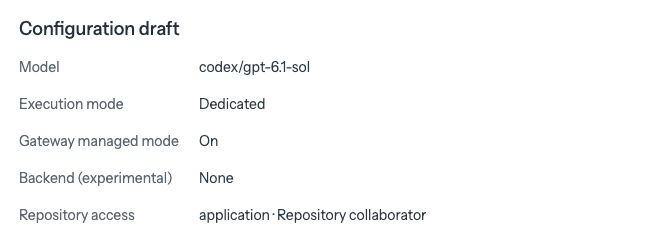
Open Agents → fred → Open draft → Repositories. Under Approved repositories, select the repository you enrolled in step 1. Check that it shows Repository collaborator, then click Save repository access. Run deployment_preflight in the operator shell before deploying.
On Agents → fred, choose Draft · Editable Configuration under Viewing version. Check the saved changes in Prepare this version, then click Deploy new version. This deploys a new version of the same Agent.
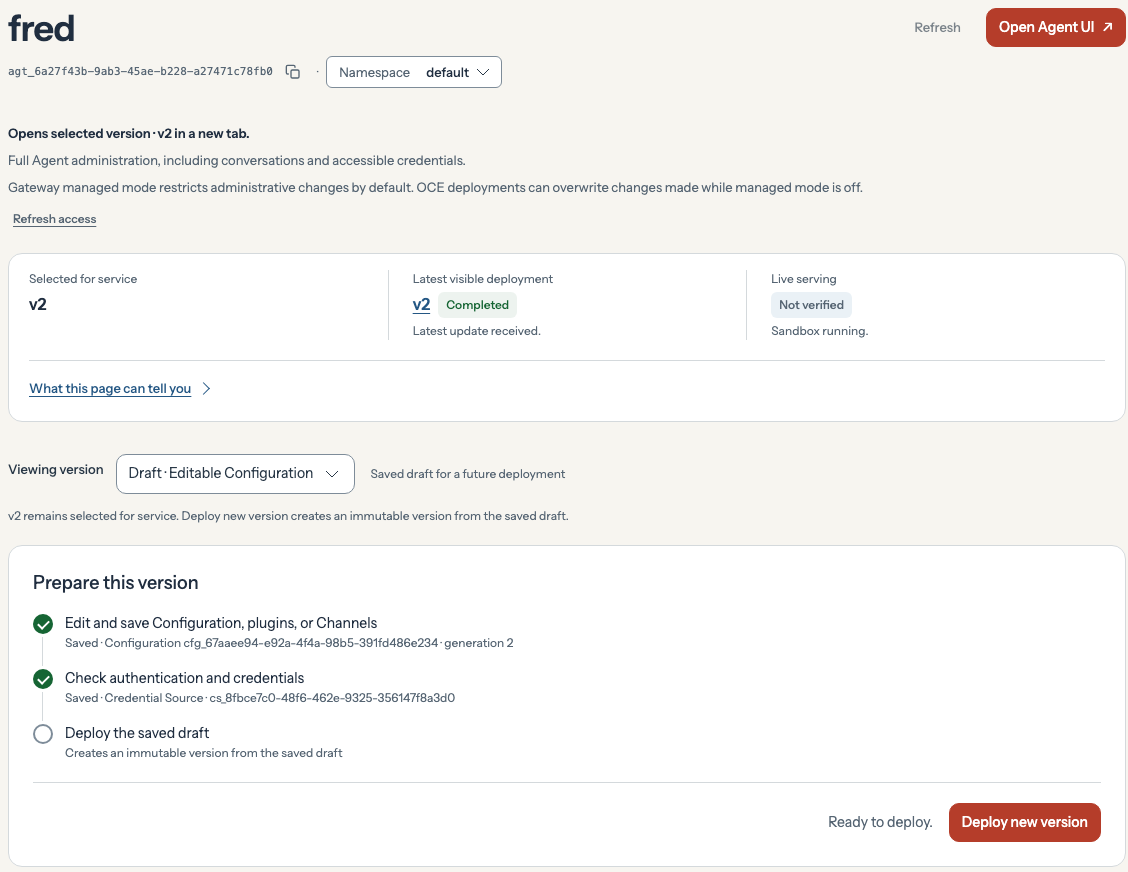
Copy the new deployment ID from the Console URL’s revision parameter. Run wait_deployment <deployment-id> in the operator shell to apply the network rules and wait for that revision.
CLI
Read the current draft and save the binding with its existing configurationId. Continue when the PATCH succeeds.
request GET "$base/agents/$agent" |jq -e --arg ref "$ref" '.data | select((.repositoryBindings // [] | length)==0) |{configurationId,repositoryBindings:[{repositoryRef:$ref,profile:"github-repository"}]}' > "$RUN_DIR/git-binding.json" &&request PATCH "$base/agents/$agent" --data-binary @- < "$RUN_DIR/git-binding.json" > "$RUN_DIR/git-agent"deploy_and_waitRecord the revision for the optional renewal check.
revision=$(request GET "$base/agents/$agent" | jq -er .data.activeRevisionId)printf 'Agent %s, active revision %s\n' "$agent" "$revision"A ready Agent alone does not prove Git access. Under a finite grant the worker can renew tokens only while the grant remains active. For continuing access beyond the session, consult standing approval.
3. Push the first empty commit through OpenClaw
Keep repo and APP_ID from enrollment. Open the GitHub App’s settings, confirm its App ID, and set APP_SLUG to the name after /settings/apps/ in its URL. If the App is private, set APP_VISIBILITY=private. The operator shell verifies the bot identity and commit SHAs. The Agent pushes using native Git and the managed credential helper.
app_id=$(kube -n "$PLATFORM_NS" get cm "$WRITE_REGISTRY" -o json | jq -er '.data["registry.json"]|fromjson|.appId|tostring')test "$app_id" = "${APP_ID:?Set the App ID from GitHub}"if [[ ${APP_VISIBILITY:-public} == private ]]; then BOT_NAME="${APP_SLUG:?Set the slug from the verified private App’s settings}[bot]"else BOT_NAME=$(gh api "apps/${APP_SLUG:?Set the App slug from GitHub}" | jq -er --arg id "$app_id" 'select((.id|tostring)==$id)|.slug+"[bot]"')fibot_id=$(gh api "users/$(jq -rn --arg login "$BOT_NAME" '$login|@uri')" | jq -er --arg login "$BOT_NAME" 'select(.type=="Bot" and .login==$login)|.id|numbers')BOT_EMAIL="${bot_id}+${BOT_NAME}@users.noreply.github.com"branch="codex/fred-demo-$(date -u +%Y%m%dT%H%M%SZ)-$(openssl rand -hex 4)"default_branch=$(gh api "repos/$repo" --jq .default_branch)base_sha=$(gh api "repos/$repo/git/ref/heads/$default_branch" --jq .object.sha)push_turn() { local phase=$1 parent=$2 { printf 'Use native execution in the same assigned workspace. Run the following in non-login Bash. Stop on any error or approval. Do not print credentials, change Git or TLS policy, touch other refs or repeat an uncertain push.\n' printf 'repo=%q\nbranch=%q\nparent=%q\ndefault_branch=%q\nphase=%q\nbot=%q\nemail=%q\n' \ "$repo" "$branch" "$parent" "$default_branch" "$phase" "${BOT_NAME:?}" "${BOT_EMAIL:?}" cat <<'SCRIPT'set -euo pipefailurl="https://github.com/$repo.git"mkdir "${branch##*/}-$phase"cd "${branch##*/}-$phase"git initgit remote add origin "$url"source_branch=$default_branchcommit_title="Verify Fred’s private repository access"if [[ $phase == second ]]; then source_branch=$branch commit_title="OpenShell Git renewal second"figit fetch --no-tags --depth=1 origin "refs/heads/$source_branch:refs/remotes/origin/$source_branch"test "$(git rev-parse FETCH_HEAD)" = "$parent"git checkout --detach FETCH_HEADgit -c user.name="$bot" -c user.email="$email" commit --allow-empty -m "$commit_title"if [[ $phase == first ]]; then if git ls-remote --exit-code --heads "$url" "refs/heads/$branch"; then exit 1; else test "$?" = 2; fielse test "$(git ls-remote --exit-code --heads "$url" "refs/heads/$branch" | cut -f1)" = "$parent"fi# The remote must still advertise the parent before the empty commit is sent.# Current Sandbox environments enable negotiation; keep it explicit for older revisions.test "$(git ls-remote --exit-code origin "refs/heads/$source_branch" | cut -f1)" = "$parent"git -c push.negotiate=true push --thin --porcelain origin "HEAD:refs/heads/$branch"local_sha=$(git rev-parse HEAD)remote_sha=$(git ls-remote --exit-code --heads "$url" "refs/heads/$branch" | cut -f1)test "$remote_sha" = "$local_sha"printf 'LOCAL_SHA=%s REMOTE_SHA=%s\n' "$local_sha" "$remote_sha"SCRIPT } > "$RUN_DIR/$phase-prompt" if [[ ${GIT_TURN_INTERFACE:-cli} == cli ]]; then turn "$RUN_DIR/$phase-prompt" > "$RUN_DIR/$phase-result" fi}Console
Generate the exact prompt without sending it:
GIT_TURN_INTERFACE=console push_turn first "$base_sha"cat "$RUN_DIR/first-prompt"Open Agents → fred, select the running version under Viewing version, and click Open Agent UI. The Agent's Control UI opens in a new tab.

In fred’s Control UI, use a conversation with Default permissions so fred can run Bash. If your current conversation uses Workspace, open a new conversation with fred and keep Default.
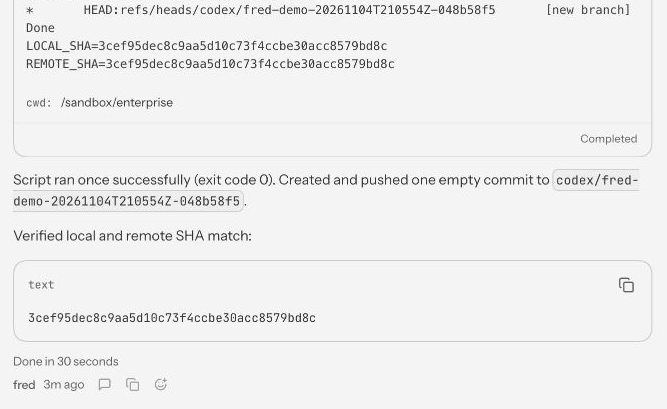
Send the generated prompt once. Open the Git tool output and record its LOCAL_SHA when it matches REMOTE_SHA. If the result is unclear, inspect the branch on GitHub without resending the prompt.
CLI
push_turn first "$base_sha"4. Verify the remote ref
Control UI and GitHub
Find the SHA in fred’s Control UI. Expand Worked above fred’s reply and open the successful Bash command. Find the 40-character value after LOCAL_SHA=. Check that the text block under Verified local and remote SHA match repeats that value, then click its copy button.
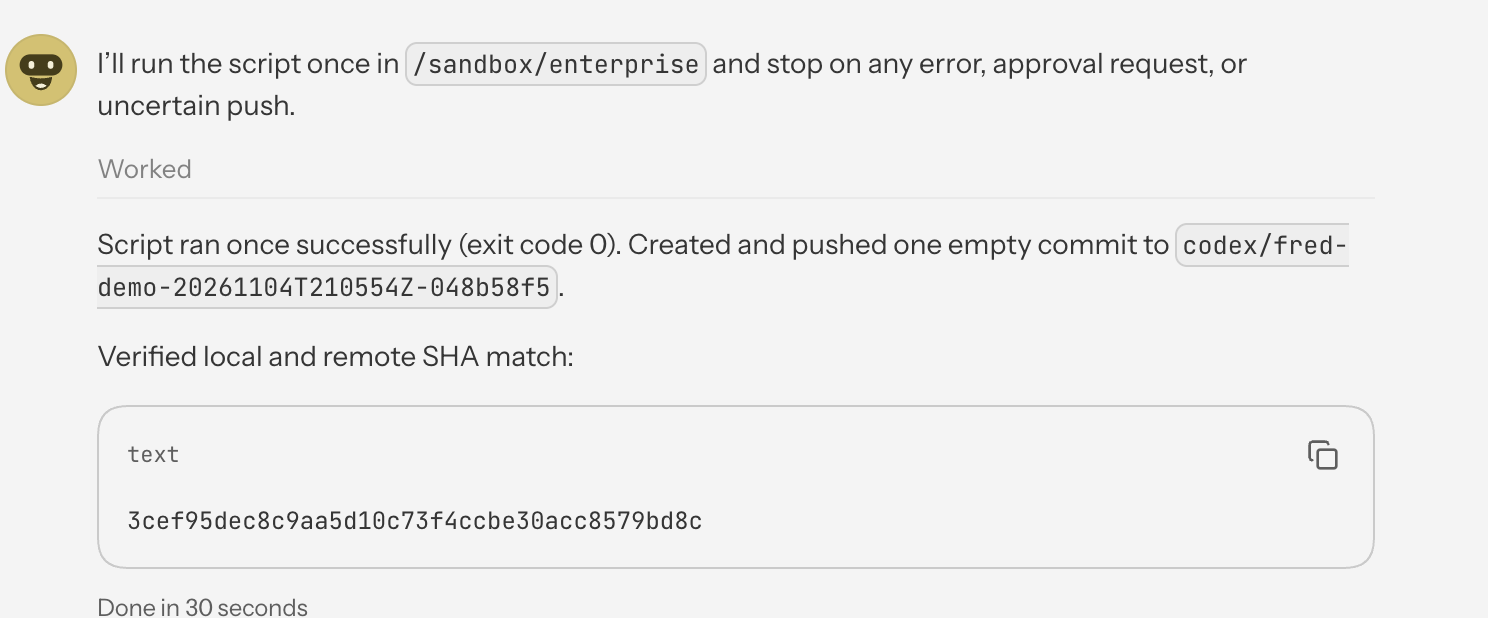
Compare it with GitHub. Open your test repository’s codex/fred-demo-… branch from fred’s output and select Verify Fred’s private repository access. Each run has its own branch suffix and SHA. Copy the commit SHA and compare all 40 characters with LOCAL_SHA. Confirm the parent is base_sha, zero files changed, and both author and committer match the verified App bot’s name and email.
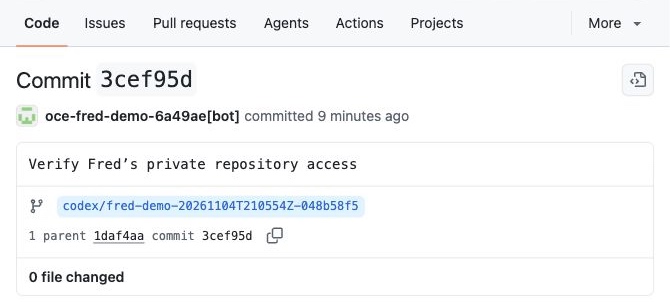
Use the CLI path for the optional renewal proof.
CLI
verify_push() {local phase=$1 parent=$2 sha tree remote_sha commit# Read the commit ID from successful native tool output, not from an inferred reply.sha=$(jq -er 'select(.outcome.status=="ok") | [.history.messages[] |select(.role=="toolResult" and .isError==false and (.toolName=="bash" or .toolName=="exec")) |.content[]?.text? | strings | capture("LOCAL_SHA=(?<sha>[0-9a-f]{40})").sha] |unique | select(length==1) | first' "$RUN_DIR/$phase-result") || return 1remote_sha=$(gh api "repos/$repo/git/ref/heads/$branch" --jq .object.sha) || return 1test "$remote_sha" = "$sha" || return 1tree=$(gh api "repos/$repo/git/commits/$parent" --jq .tree.sha) || return 1commit=$(gh api "repos/$repo/commits/$sha") || return 1jq -e --arg p "$parent" --arg t "$tree" --arg bot "$BOT_NAME" --arg email "$BOT_EMAIL" \'(.parents|length)==1 and .parents[0].sha==$p and .commit.tree.sha==$t and (.files|length)==0 and .author.login==$bot and .committer.login==$bot and all(.commit.author,.commit.committer; .name==$bot and .email==$email)' \<<<"$commit" >/dev/null || return 1printf '%s\n' "$sha"}first_sha=$(verify_push first "$base_sha")printf 'First commit: https://github.com/%s/commit/%s\n' "$repo" "$first_sha"5. Restore read-only access
Save the verified branch and session values before leaving this shell. For Console verification, set first_sha to the independently verified commit first:
save_sessionAfter verifying the push, restore read-only Git access on this same Agent. This is the shared procedure for local k3d, Kubernetes and EKS. Keep the original browser conversation and workspace. Then continue to Add Plugin, or delete the Agent when finished.